Introduction and Setup
What is Docker?
Docker is a software containerization platform used to package and run applications both locally and on cloud systems, eliminating "it works on my machine" problems. It provides an environment for running containers on any platform, based on containerd.
Key benefits of Docker include:
- Faster building, testing, deployment, updating, and error recovery compared to standard application deployment methods.
- A uniform development and production environment, eliminating compatibility issues with operating systems and conflicts between library/package versions on the host system.
- Ephemeral containers, meaning the failure or shutdown of one container doesn't crash the entire system.
- Consistency between development and production environments.
- Maximum flexibility for large-scale projects, allowing easy integration of new software tools as requirements change.
- Easy replication of infrastructure in different environments using saved Docker images from a registry.
- Simple updates of components by rewriting images, ensuring the latest versions are always deployed as containers.
Docker thus provides a versatile and efficient solution for modern software development and deployment challenges.
Docker architecture
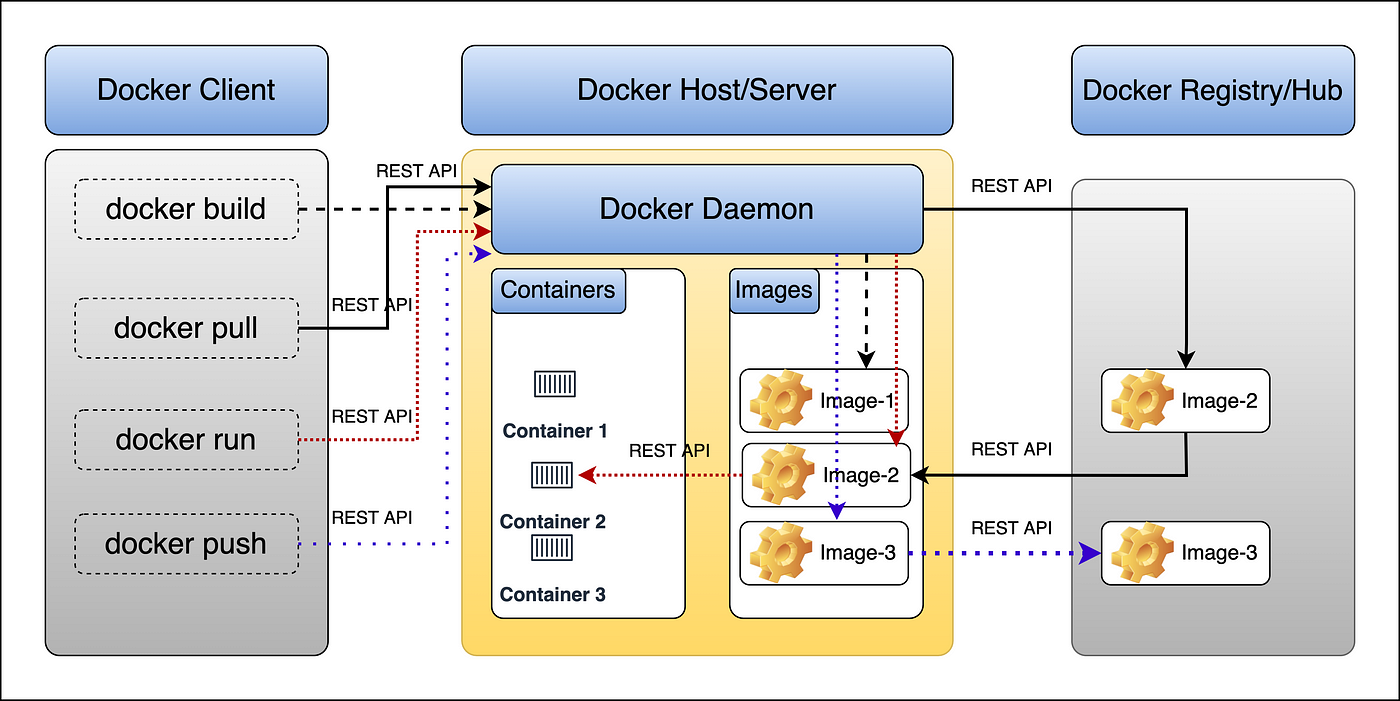
Above picture taken from Medium.
Docker Setup
If you get stuck or do not know what steps need to be taken, please ask the course instructors to help you. It is very important that you have your Docker engine properly set-up as this is the basis for the Swarm/orchestration chapters, also.
Overview of docker concepts that will be discussed in this course
- Containers and images (and the difference between them)
- The Docker CLI and the container lifecycle
- Dockerfile: building your own images, layering and caching
- Environment variables and build arguments
- Networks and container-to-container communication
- Port mapping and exposure
- Volumes and bind mounts (persisting data)
- Docker Compose: multi-container applications
- Registries and Docker Hub: publishing your images
- Container orchestration with Docker Swarm (services, scaling, rolling updates)