Kubernetes: a Concept Tour
You have orchestrated containers with Swarm. Now meet the tool that won the orchestration war: Kubernetes (abbreviated K8s - K, eight letters, s). This chapter is a guided tour, not a hands-on lab: the goal is that when someone says "we run it on Kubernetes", you know exactly what they mean - and that you could start learning it on your own tomorrow.
What is Kubernetes?
Kubernetes is an open-source container orchestration platform that automates the deployment, scaling, and management of containerized applications. Key points:
- Originally developed at Google (based on their internal system, Borg), now maintained by the Cloud Native Computing Foundation
- Does the same fundamental job as Swarm: desired state, scheduling, self-healing, scaling, rolling updates, cross-machine networking
- Adds a vastly bigger toolbox on top: autoscaling, storage orchestration, fine-grained access control, extensibility (you can teach it new resource types), and a giant ecosystem
- Every major cloud sells it as a managed service: Google GKE, Amazon EKS, Azure AKS
Why did the industry pick K8s over Swarm?
Honest answer: Swarm is simpler and covers the needs of most small deployments - but Kubernetes scales further in every direction that big organizations care about. Autoscaling on traffic spikes, plug-in networking and storage for any datacenter setup, policy and permission systems for hundred-person engineering orgs, and an ecosystem where every tool (monitoring, CI/CD, databases) ships with first-class K8s support. Once cloud providers started offering it managed - cluster setup being the hardest part - the network effect finished the job.
The trade-off is complexity. K8s is famously heavy for beginners: this is why you learned the concepts on Swarm first. They transfer one-to-one.
Swarm → Kubernetes dictionary
You already know more Kubernetes than you think. The translation table:
| You did this in Swarm | Kubernetes equivalent |
|---|---|
docker swarm init + join tokens | Cluster setup - kubeadm, or managed (GKE/EKS/AKS), or local (minikube, kind, k3s) |
| Manager node | Control plane (API server, scheduler, controllers, etcd database) |
| Worker node | Node (runs kubelet + a container runtime) |
| A task (one running container) | Pod - smallest deployable unit; can hold 1+ tightly-coupled containers |
| A service with replicas | Deployment (desired state + rolling updates) managing a ReplicaSet (the replica counter) |
| Routing mesh / published ports | Service (stable internal address + load balancing) and Ingress (HTTP routing from outside, like a built-in reverse proxy) |
docker service scale web=10 | kubectl scale deployment web --replicas=10, or automatic with a HorizontalPodAutoscaler |
Stack file (stack.yaml) | Manifests - YAML files, one per resource, applied with kubectl apply -f |
| Overlay network | CNI networking plugins (Flannel, Calico, Cilium...) |
.env / compose secrets | ConfigMaps and Secrets |
| Named volumes | PersistentVolumes + PersistentVolumeClaims |
docker service rollback | kubectl rollout undo |
Notice the pattern: same ideas, more moving parts, each with its own name and YAML file.
What a K8s manifest looks like
For flavor - the Deployment below is roughly docker service create --name web --replicas 3 nginx:
apiVersion: apps/v1
kind: Deployment
metadata:
  name: web
spec:
  replicas: 3
  selector:
    matchLabels:
      app: web
  template:
    metadata:
      labels:
        app: web
    spec:
      containers:
        - name: nginx
          image: nginx:1.27
          ports:
            - containerPort: 80
More verbose than Swarm - but look closely and you recognize everything: an image, a replica count, a port. Desired state, declared in YAML, reconciled by the cluster forever. It's the same loop you watched heal your services yesterday.
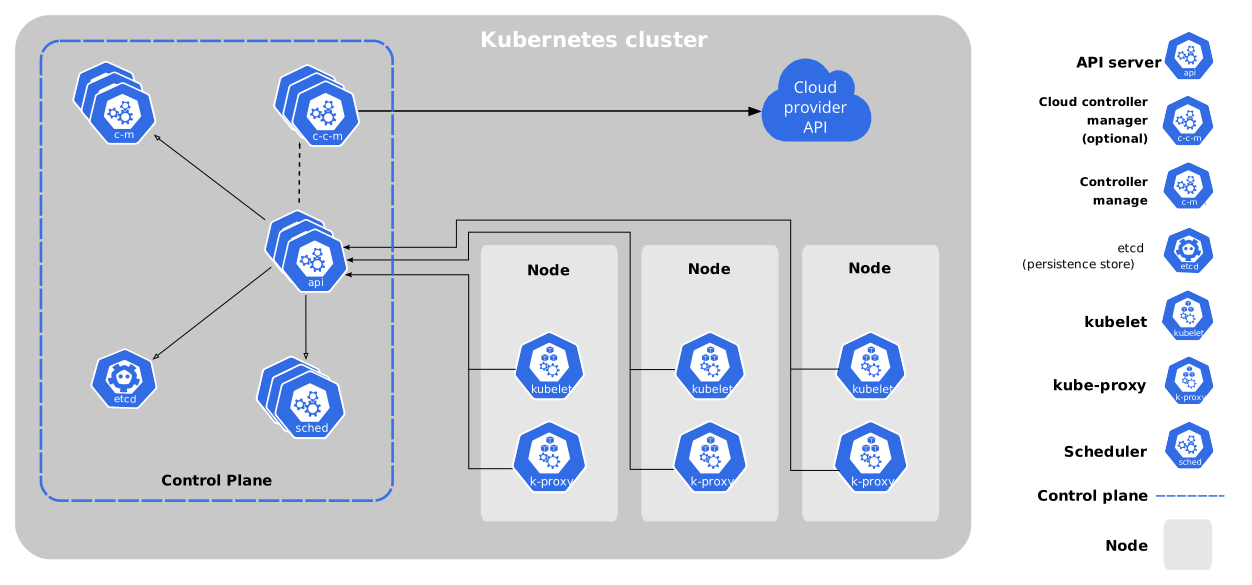
Architecture in one picture
Kubernetes uses the same manager/worker split you saw in Swarm:
-
Control plane (Swarm: manager):
- API Server - the front door;
kubectland everything else talks to it - Scheduler - assigns pods to nodes
- Controller Manager - runs the desired-state reconciliation loops
- etcd - distributed key-value store holding the cluster state
- API Server - the front door;
-
Nodes (Swarm: workers):
- Kubelet - agent that makes sure the assigned pods are running
- Container runtime - actually runs the containers (containerd)
- Kube-proxy - network plumbing for Services
When to use what
A rule of thumb to leave with:
- One machine, small app → Docker Compose (+ a reverse proxy). Most projects live happily here forever.
- A few machines, small team, want simplicity → Docker Swarm.
- Serious scale, many teams, cloud budget, need the ecosystem → Kubernetes (managed, unless you have very good reasons to run your own).
- "I just want my container on the internet" → managed platforms (Cloud Run, Fly.io, Railway...) - someone else's orchestrator.
Want to try it yourself?
The best hands-on starting points, in order:
- Play with Kubernetes - free in-browser cluster, zero install
- minikube or kind - one-node cluster on your laptop (needs a beefy-ish machine)
- The official Learn Kubernetes Basics tutorial - interactive, well made
- k3s - lightweight K8s; fun weekend project: a cluster of Raspberry Pis
- When it gets serious: Kubernetes: Up & Running (book), and the CKA certification path
Ask the instructors about any of these - happy to point you further. Now: on to your final project. 🚀