Basics - Pins, Timers, ADC, PWM
Prerequisites
- Raspberry Pi Pico or Pico W
- Micro USB cable
- A MicroPython-capable editor
- MicroPython firmware flashed on the board
Parts you'll use
- 1 x push button
- 1 x potentiometer
- 1 x LED
- 1 x resistor (for the LED)
- Breadboard + jumper wires
Safety: Never connect anything to the Pico's VBUS or 3V3 incorrectly. Use the 3V3 pin for sensors and GND for ground. Protect LEDs with a resistor.
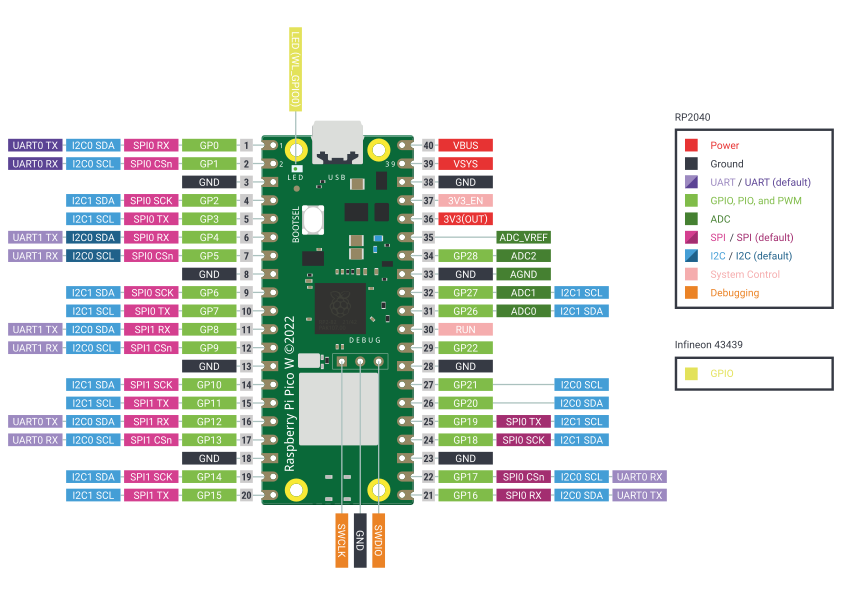
Pin cheat sheet
- Digital GPIO: GP0-GP28
- ADC inputs: GP26 (ADC0), GP27 (ADC1), GP28 (ADC2)
- Onboard LED:
- Pico W:
Pin("LED") - Pico:
Pin(25)(GP25)
- Pico W:
- PWM: almost any GPIO supports PWM via
PWM(Pin(n))
1) Toggling pins (LED)
We'll blink an external LED.
Wiring
- LED anode (long leg) -> GP0 through the resistor
- LED cathode (short leg) -> GND
Code: Blink external LED
from machine import Pin
from time import sleep

led = Pin(0, Pin.OUT)

while True:
    led.toggle()
    sleep(0.5)
How it works
Pin(..., Pin.OUT)sets the GPIO as an output.toggle()flips the pin state without tracking it yourself.sleep(0.5)waits 0.5 seconds.
Exercises
- Change the blink rate to 5 times per second.
- Make a pattern: short-short-long (like Morse "U").
2) Reading digital pins
We'll read a push button and control an LED.
Wiring (pull-down example)
- Button one leg -> GP1
- Button other leg -> 3V3
- 10 kOhm resistor from GP14 -> GND (external pull-down) Or use the Pico's internal pull-down to skip the resistor (see code).
- LED (optional): anode -> GP0 through resistor, cathode -> GND
You can use the internal pull-up/pull-down resistors to simplify wiring.
Code: Button with internal pull-down
from machine import Pin
from time import sleep

# Input with internal pull-down means the pin reads 0 when unpressed
button = Pin(1, Pin.IN, Pin.PULL_DOWN)

led = Pin(0, Pin.OUT)

while True:
    if button.value():           # 1 when pressed
        led.on()
    else:
        led.off()
    sleep(0.01)                  # tiny delay helps CPU + debounce a bit
Exercises
- Invert the logic (LED on when not pressed).
- Add a long-press (>1s) action that blinks the LED rapidly.
3) Timers
We'll toggle the led using a timer interrupt.
Wiring (pull-down example)
- Button one leg -> GP1
- Button other leg -> 3V3
- 10 kOhm resistor from GP14 -> GND (external pull-down) Or use the Pico's internal pull-down to skip the resistor (see code).
- LED (optional): anode -> GP0 through resistor, cathode -> GND
You can use the internal pull-up/pull-down resistors to simplify wiring.
Code: Button with internal pull-down
from machine import Pin, Timer

led = Pin(0, Pin.OUT)
timer = Timer()

def blink(timer):
    led.toggle()

timer.init(freq=2.5, mode=Timer.PERIODIC, callback=blink)

# We need to stall for the program to keep running
while True:
    pass
Exercises
When the button is pressed, change between two blinking frequencies.
4) Reading ADC (potentiometer)
We'll read an analog voltage (0-3.3 V) from a potentiometer using the Pico's ADC.
Wiring
- Potentiometer middle wiper -> ADC0 (GP26)
- Pot one side -> 3V3
- Pot other side -> GND
Code: Read ADC and print both raw and scaled values
from machine import ADC, Pin
from time import sleep

adc = ADC(26)  # GP26 = ADC0

while True:
    raw = adc.read_u16()         # 0..65535
    volts = (raw / 65535) * 3.3  # scale to 0..3.3V
    print("raw:", raw, " volts:", round(volts, 3))
    sleep(0.1)
The Pico's
read_u16()returns a 16-bit value (0-65535). The analog reference is 3.3 V (board's 3V3 rail).
Exercise: Disco!
Change the frequency with which the led blinks based on the potentiometer.
5) PWM (fade an LED)
PWM lets you control brightness by switching the LED on and off very fast. The perceived brightness depends on the duty cycle.
Wiring
- LED anode -> GP0 through the resistor
- LED cathode -> GND
Code: Fade up and down with PWM
from machine import Pin, PWM
from time import sleep

led_pin = Pin(0, Pin.OUT)   # external LED on GP0
pwm = PWM(led_pin)
pwm.freq(1000)               # 1 kHz is a good default

# Duty range is 0..65535
while True:
    # fade up
    for duty in range(0, 65536, 1024):
        pwm.duty_u16(duty)
        sleep(0.01)
    # fade down
    for duty in range(65535, -1, -1024):
        pwm.duty_u16(duty)
        sleep(0.01)
Mapping potentiometer -> brightness
Combine ADC + PWM: twist the pot to change LED brightness.
from machine import ADC, Pin, PWM
from time import sleep

adc = ADC(26)               # potentiometer on GP26 (ADC0)
pwm = PWM(Pin(0))           # LED on GP0
pwm.freq(1000)

while True:
    duty = adc.read_u16()   # already 0..65535, perfect for duty
    pwm.duty_u16(duty)
    sleep(0.01)
Exercises
- Try different PWM frequencies (10 Hz, 120 Hz, 500 Hz). Do you notice flicker?
- Add a gamma curve so brightness appears more linear to your eyes:
duty = int((value/65535) ** 2.2 * 65535)
- Use the button as an on/off for the PWM brightness from the pot.
Putting it all together (mini-project)
Create a touch lamp:
- Button toggles the lamp (PWM LED) on/off.
- Potentiometer sets brightness when the lamp is on.
- Long-press the button (>1s) to enter a breathing mode (automatic fade).
- Short press exits breathing mode back to manual brightness.
Hints:
- Track a
modevariable ("off","manual","breathing"). - Use a debounced button with long-press detection.
- In breathing mode, run the fade loop; in manual, map ADC -> duty.
Troubleshooting checklist
- LED never lights?
- Check polarity (long leg to resistor/GPIO).
- Button always reads 1 or 0?
- Ensure you enabled the correct pull (
PULL_UPorPULL_DOWN) and wired to GND/3V3 accordingly.
- Ensure you enabled the correct pull (
- ADC readings jumpy?
- Use a moving average, keep wires short, share a solid GND.
- PWM looks weird?
- Lower or raise
pwm.freq()to avoid visible flicker or buzzing.
- Lower or raise
Challenge ideas
- Implement software PWM on a pin without hardware PWM (for learning).
- Add a status LED that blinks out the current mode (1 blink = off, 2 = manual, 3 = breathing).
- Log ADC values over USB serial and plot them on your computer.
- Implement a semaphore using an RGB LED. Use a button.
- Build a "Christmas tree" lighting system using an RGB LED. It should change the sequence when the button is pressed.
Reference snippets
Internal pull-ups example (wire button to GND):
button = Pin(1, Pin.IN, Pin.PULL_UP) # reads 1 idle, 0 when pressed
Button interrupt (edge-triggered) to toggle an LED:
from machine import Pin
from time import sleep

led = Pin(0, Pin.OUT)  # or Pin("LED")
state = 0

def on_press(pin):
    global state
    state ^= 1
    led.value(state)

button = Pin(1, Pin.IN, Pin.PULL_DOWN)
button.irq(trigger=Pin.IRQ_RISING, handler=on_press)

while True:
    sleep(1)  # main loop can do other work